27 March 2026 – Version 2.2.5
- Full access to the Links Explorer tool has been restored for all future SEO Audit reports. It allows you to analyze crawled pages, files, and URLs across 100+ parameters, with flexible data filtering and export options.
16 March 2026 – Version 2.2.3
- Introduced Custom URL List as a new crawl mode across all subscription plans. This allows you to run audits on a user-defined list of URLs during project setup.
- RUM tracking is disabled for this mode, and crawl limits remain aligned with your plan’s page/audit limits.

09 March 2026 – Version 2.2.1
- Added metrics comparison across Audit History and reports, making it easier to analyze performance trends and compare results over time.

23 Feb 2026 – Creeper SEO Spider – Version 2.2.0
Launched the official Creeper SEO Spider, featuring a fully integrated in-house crawling engine now available to all users.
Key updates include:
- Detection of 100+ SEO issues (with more being added continuously)
- Faster and more efficient audits
- Transition from URL-based to page-based credit system for deeper, more comprehensive crawling
Crawl comparison (approx.):
- 100 pages ≈ 1,500–2,000 URLs
- 250 pages ≈ 5,000+ URLs
- 500 pages ≈ 12,000+ URLs
- 1,000 pages ≈ 25,000+ URLs
All existing accounts have been upgraded to the new page-based system (see pricing page for details).
We’re also working on restoring in-depth Links Explorer access and introducing JavaScript-based rendering for audits later this year.
29 Dec 2025 – Version 2.0.5
- The SEO Audit part of the tool is currently unavailable due to licensing issues. We are actively working to resolve this. In the meantime, you can continue using our enterprise-grade Real User Core Web Vitals Monitoring tool as part of your existing subscription package.
- Restored access to RUM Vitals for all users.
- Increased the monthly RUM Events tracking limit for all Freemium accounts to 10,000 events per month.
- Added Edit Project and Delete Project buttons to the RUM Vitals dashboard.
- Added the remaining days until the next credit reset on the profile page.
16 Dec 2025 – Version 2.0.1
Improvements & Fixes
- Fixed redirection issues between the legacy UI and the new UI.
- Resolved multiple logic bugs that caused Internal Server Error when accessing Key Highlights and other RUM reports.
- Improved handling of newly active RUM projects:
- Active projects with less than 24 hours of RUM data now automatically redirect to the Realtime report.
- A notification is displayed informing users that all other RUM reports will become available after 24 hours.
- The same notification is now shown on the Key Highlights report for newly active projects, as RUM reports only becomes available after 24 hours.
- Fixed a security issue in the RUM Tracking API.
15 Dec 2025 – Unified Platform Update – Version 2.0
Code Name: “Neurite fusion”
1. Platform Unification
- Creeper SEO Audit and RUM Vitals have been fully merged into a single, streamlined platform—providing a unified and complete Technical SEO auditing experience.
2. Project Lifecycle Enhancements
Unified Project Creation & Editing
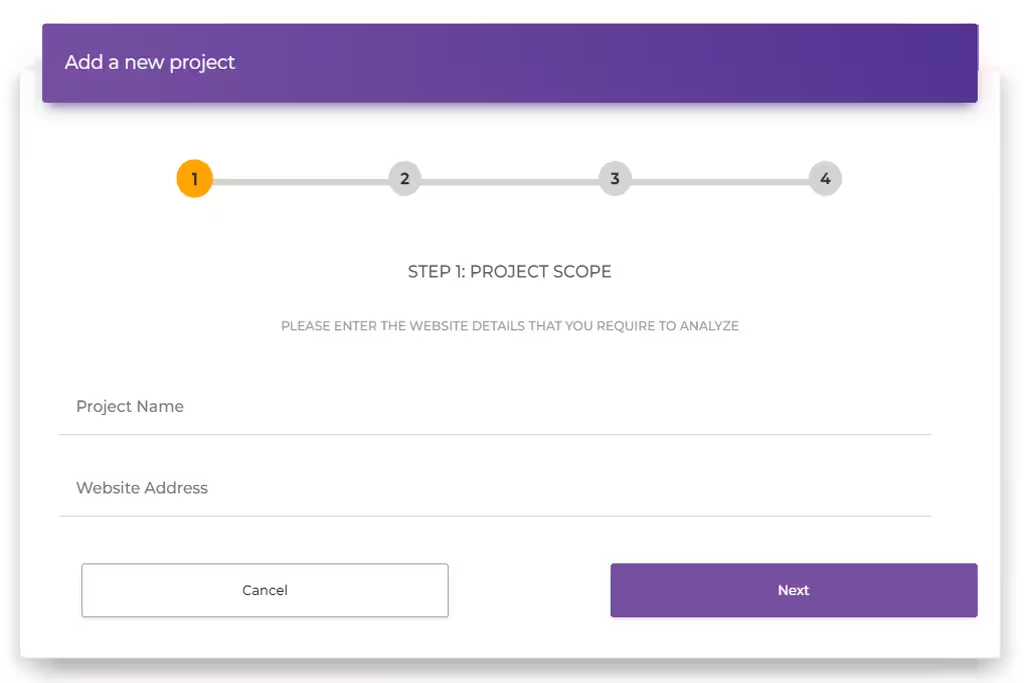
- Project creation is now streamlined, allowing users to configure both SEO Audit and RUM settings at the same time.
- The “Add New Project” interface has been redesigned into a 4-step guided flow, including:
- Contextual help on the left side for each step
- A distraction-free final review step showing all selected settings
- A prompt to install the RUM tracking script after the project is created
- The “Edit Project” interface has been rebuilt from scratch following the same structure as project creation.
- Users still cannot change the project URL, but all other settings remain editable.
Project Deletion & Validation Improvements
- The “Delete Project” flow now includes explicit warnings outlining what data will be permanently removed. Users must confirm via a required checkbox.
- Input validation has been significantly improved across adding, editing, and deleting projects.
- A double-validation system now checks data both on the client-side and again on the backend before committing any changes—reducing downtime and failed submissions.
3. Dashboard Improvements
Navigation & Layout Updates
- A permanent left sidebar has been introduced for consistent navigation across the entire app—previously visible only inside project reports.
- The tool switcher has been moved from the top navigation bar into the left sidebar.
Main Dashboard Enhancements
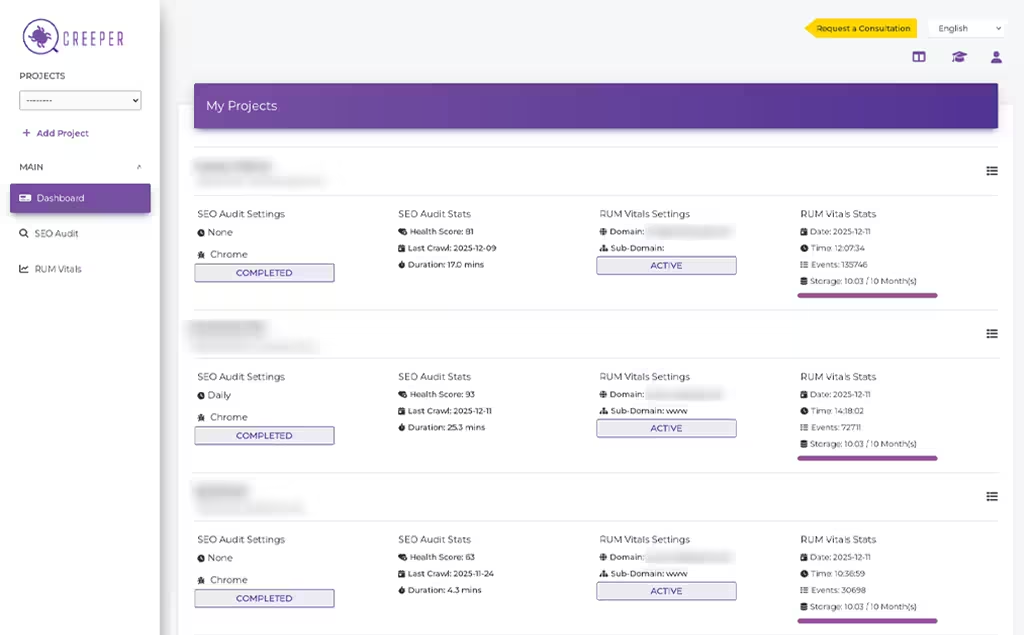
- The main dashboard now shows project settings and key audit stats upfront, allowing users to instantly spot:
- Project status
- Audit failures/successes
- RUM tracking issues
- The project dropdown now includes all key actions in one place, including Edit, Delete, Install, Run Audit, SEO Audit Report, and RUM Report—no more switching between tool views.
- Tool-specific dashboards (SEO Audit & RUM Vitals) remain available but improved:
- SEO Audit dashboard: “Run Audit” button replaces the old “More” dropdown.
- RUM Vitals dashboard: “Install” button replaces the old “More” dropdown.
- Selecting projects from tool-specific dashboards now takes users directly to the corresponding report in the unified reporting interface.
4. Project Reports Enhancements
Updated Sidebar & Structure
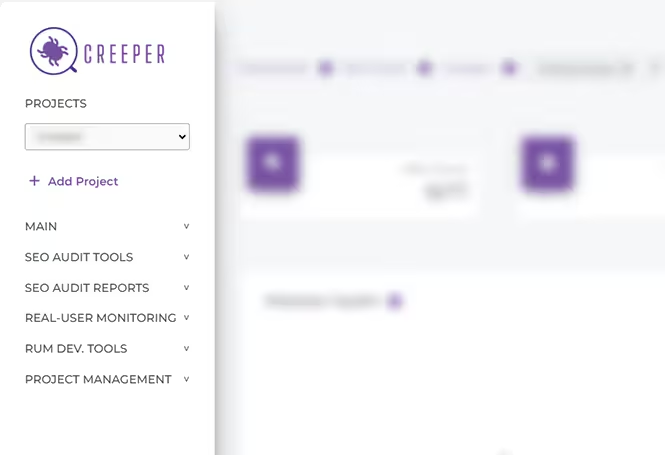
- The project reports sidebar has been completely redesigned.
- All reports are now grouped into collapsible sections, including:
- Main
- SEO Audit Tools
- SEO Audit Reports
- Real-User Monitoring
- RUM Dev Tools
- Project Management
- By default, all sections remain collapsed except the one containing the currently opened report—reducing clutter and distractions.
Faster Project & Audit Switching
- A new Projects Dropdown has been added inside the sidebar for instant project switching.
- No need to return to the main dashboard
- Switching is report-sensitive: you remain on the same report when switching projects
- A new Audit History Dropdown in the breadcrumb bar allows switching between different audit sessions without returning to the Audit History page.
- The breadcrumb navigation has been optimized for better clarity and workflow.
- Together, these additions dramatically reduce back-and-forth navigation between dashboards and project views.
New Unified Report
- Key Highlights Report – A new combined report showcasing the most important KPIs from both SEO Audit and Real-User Monitoring in one place, ideal for client-ready reporting.
5. Real-User Monitoring (RUM) Updates
- RUM tracking is now powered by an event-based tracking model instead of page-view based tracking—offering more accuracy and flexibility.
6. Free RUM Access for All Users
- RUM Vitals tool is now free for all users.
- All users now receive 2,500 free RUM events per month (equivalent to ~500 page views/mo).
- All existing projects have been automatically upgraded to support RUM tracking.
- Simply install the script to begin Real-User Core Web Vitals tracking.