TL;DR
Lab Data: A simulated test in a perfect environment (Lighthouse). It’s a “flight simulator.”
Field Data (RUM): What your actual visitors experience on their real devices. This is the “real flight.”
The Problem: You can have a “green” lab score and still fail Google’s ranking checks because your real users are experiencing lag you can’t see in a test.
You’re probably looking at a green 90+ score in PageSpeed Insights. Maybe your agency just sent you a report boasting about perfect Core Web Vitals.
But you’re still losing money.
Contents

Lab data, while pretty, is a lie when it comes to real user experience. It’s a simulated fantasy, not your customer’s reality. And frankly, this obsession with perfect lab scores is costing businesses conversions, rankings, and client retention.
The Cold, Hard Truth About Lab Data in Website Speed Testing
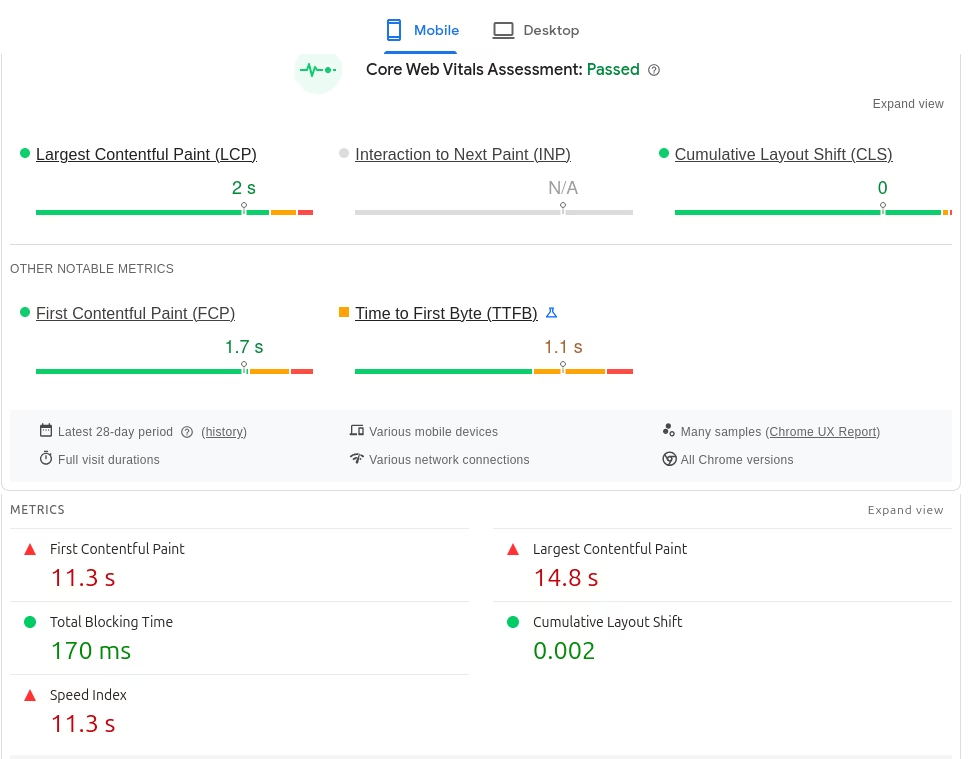
Here’s the problem: Lab data (like what you get from Lighthouse or PageSpeed Insights) runs tests in a perfectly controlled, simulated environment. Think of it as a meticulously choreographed science experiment. It’s like testing a car’s top speed on a treadmill instead of a real road.
It assumes:
- A perfect internet connection.
- A high-end device.
- No other tabs or apps running in the background.
- No real-world distractions.
Crucially, lab data fails to measure how your site actually behaves when touched.
Take Interaction to Next Paint (INP) as an example. Becauselab tools are just bots loading a page, they can’t “interact” with it. They don’t click buttons, toggle menus, or type in search bars like a real person does. Since there is no human interaction, there is no INP score to measure.
Instead, lab tools give you a metric called Total Blocking Time (TBT). This is just a guess—a proxy for how responsive the page might be. But a guess isn’t a strategy. This is why your scores look great in the office, but your site feels broken to a customer on a train or in a rural area.
If a customer is using a three-year-old Android phone on a spotty 4G connection, your “1.5-second” lab score might actually be a 6-second wait for them. That is a lost sale.

Studies show the impact of load time on conversions. Every single time. It’s about your Core Web Vitals looking stellar in a report, but Google’s algorithms – which use real user data – see a different, slower story.
You get a score, you feel good, but your business isn’t actually moving faster where it counts. It’s a vanity metric that hides real performance issues.

Enter RUM: Why it Makes Sense for Your SEO
This is where Real User Monitoring (RUM) comes in. RUM doesn’t guess. It tracks what your actual customers are experiencing on their actual devices, in their actual locations, in real-time.
Google knows this. In fact, Google’s ranking algorithms—specifically the Chrome User Experience Report (CrUX)—use real-world field data, not lab scores, to determine your search position. If you aren’t measuring RUM, you are flying blind against Google’s core ranking signals.
Imagine seeing your Largest Contentful Paint (LCP) for mobile users in New York City compared to desktop users in London. Or understanding how a specific browser version impacts your Interaction to Next Paint (INP). RUM gives you this granular, real-world data. It turns abstract numbers into actionable insights.
How RUM Improves Your Core Web Vitals (LCP, INP, CLS)
Google cares about real user experience. Google’s page experience signals. So much so, their ranking algorithms explicitly use real user data for Core Web Vitals. Official Google Search Central documentation. If you’re not measuring RUM, you’re flying blind against Google’s core ranking signals. RUM gives you the “Field Data” you need to satisfy Google and your users:
- LCP (Largest Contentful Paint): RUM tells you the true loading speed for the main content element your users see. Not a simulated average, but the actual time it took for the person who matters: your customer.
- INP (Interaction to Next Paint): RUM shows you how quickly your site responds to actual taps and clicks from users. Lab tests struggle to simulate this, but RUM tracks every frustrated click from a real human.
- CLS (Cumulative Layout Shift): RUM highlights those annoying shifts that happen when a real user scrolls—things a bot might miss.

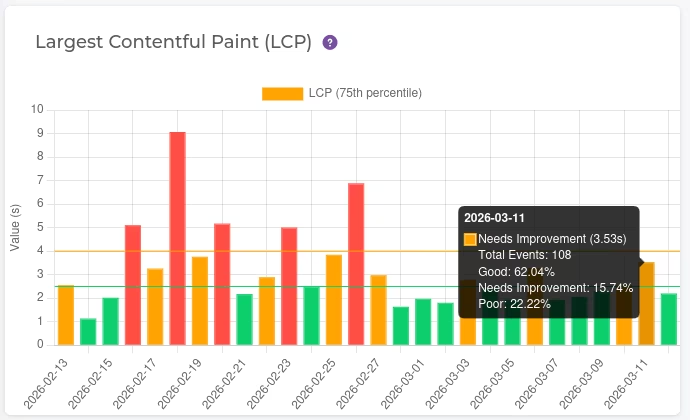
Imagine your LCP looks great in the lab. But RUM shows that for 30% of your mobile users in rural areas, LCP is consistently above 4 seconds. That’s a huge segment getting a bad experience, impacting their willingness to convert and telling Google your site isn’t as good as you think. Only RUM reveals this.
Where RUM Falls Short
RUM is the truth, but it isn’t a magic wand. There are a few things it can’t do:
- It needs traffic. If a page has zero visitors, you have zero data. Lab tests are better for testing new pages before they go live.
- User noise. If a customer is browsing in a tunnel on a 10-year-old phone, their slow score stays in your data. It’s not your site’s fault, but it still impacts your averages.
- No “re-test” button. You can’t just click a button to see if a fix worked. You have to deploy the change and wait for new visitors to interact with the site.
- To collect real user metrics, you need to be able to run code on the page, which means you can only do it for your own sites.
Lab vs Real Data Bottom Line
You shouldn’t pick one or the other. Use Lab Data to catch big mistakes before you push them live, and use RUM to see how your site is actually performing in the real world (once you get there) where the money is made.
The Creeper Advantage: Real Data, Real Solutions
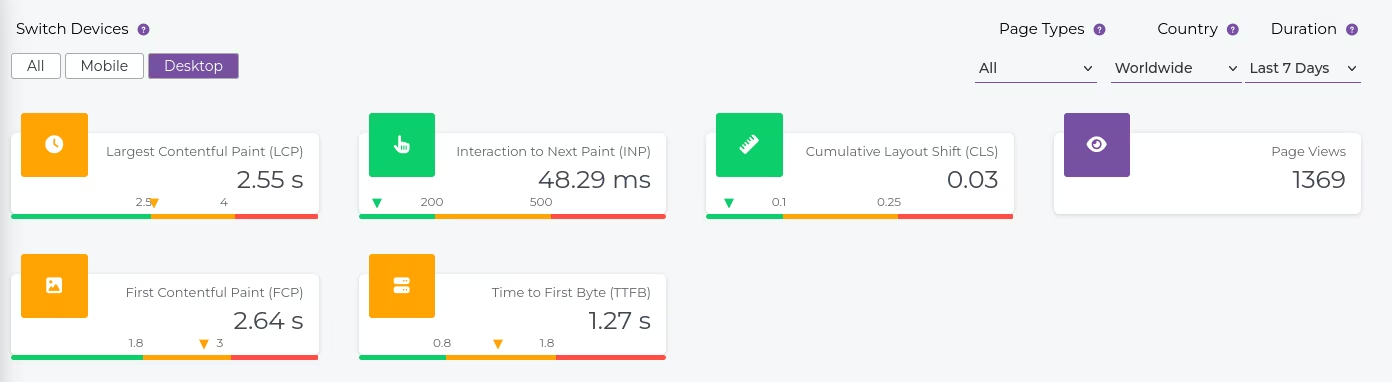
We don’t just give you a report and wish you luck. Creeper RUM shows you your real Core Web Vitals based on your actual visitors, not theoretical ones. You see the truth about your LCP, INP, and CLS broken down by device, geography, and browser. No more guessing. No more relying on green scores that hide real problems. Creeper RUM shows you.
You get a clear list of what’s failing for real people. And if you don’t have a developer on hand to fix it? Our team handles the technical heavy lifting for you, turning those red RUM scores into actual rankings.
Stop chasing fake scores. Start getting real results.
Start your free Creeper RUM trial today.
And if you don’t want to touch the code yourself? Our expert team can fix these Core Web Vitals errors directly, turning those red RUM scores into conversions and better rankings.
Full website speed optimization services.
Frequently Asked Questions
Find answers to common questions here.