This guide breaks down the single most important part of SEO: making your site easy for search engines to find, understand, and trust.
Contents
Your Website’s Most Important Visitor
You’ve poured hours into making your website perfect for your customers. But before any of them can find you, you first need to win over a different kind of visitor: a web crawler. Getting this one crucial relationship right is the foundation for earning traffic from search engines like Google, Bing, and others that constantly explore the internet.
Let’s use a powerful historical analogy. The ancient Library of Alexandria had a legendary goal: to collect a copy of every scroll in the known world. To achieve this, the city had a remarkable policy – librarians were sent to the docks to board newly arrived ships, not just to browse, but to find and copy every single book they found.
Web crawlers from search engines like Google and Bing operate on that same epic principle. They are our modern-day librarians, tirelessly exploring the digital ‘docks’ of the internet. Their job is to discover your website (the book), understand its contents, and bring a copy back to be placed in the world’s largest library: the search index. If these digital librarians don’t find your site, it simply won’t have a place in the catalog for people to discover.
By the end of this guide, you will be able to:
- Implement a 5-point checklist to ensure your site is perfectly optimized for crawlers.
- Understand exactly what web crawlers are and why they are critical for your business.
- Visualize the journey a crawler takes through your site, from discovery to indexing.
- Control how crawlers interact with your website using simple but powerful commands.
What is a Web Crawler? (Decoding the “Bot”)
The Official Definition
In the world of SEO, you’ll encounter several terms that mean the same thing. Let’s get them straight:
- Web Crawler: The official term for an automated program that systematically browses the internet.
- Spider: A slang term for a web crawler, named for the way it travels along the ‘web’ of links.
- Bot: A shortened version of ‘robot,’ this is a general term for any automated program, including crawlers.
Who Sends Them?
While hundreds of crawlers exist, they fall into a few key categories:
- Search Engine Crawlers: Sent by Google (Googlebot) and Microsoft (Bingbot). These are the most critical, as they determine how you rank in search results.
- Commercial Data Crawlers: Sent by major SEO tool companies like Ahrefs (AhrefsBot) and Semrush (SemrushBot) to gather data for their platforms.
- Site Audit Crawlers: These are crawlers you use for your own benefit. Tools like Screaming Frog and the engine that powers the Creeper SEO Audit are this type of bot, designed to safely scan your site on your command to find optimization opportunities.
The Core Mission
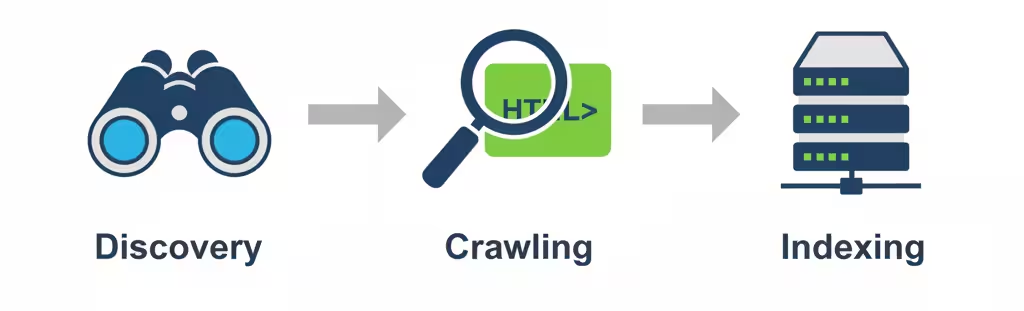
So what does a crawler actually do? Its mission is a continuous, three-step loop. First, it’s constantly in ‘discovery‘ mode, finding URLs for new and updated web pages. Once it has a list of addresses, it begins ‘crawling,’ which means it visits each page to download and analyze its contents – from the words you see to the code behind the scenes. Finally, and most importantly, it takes the useful information it found and adds it to the search engine’s colossal database, a process called ‘indexing.’ Think of it this way: discovery is finding the book, crawling is reading it, and indexing is putting it on the library shelf so people can find it.
Feeling curious about how your own site’s blueprint looks to a crawler? The Creeper SEO Audit can show you exactly that with a free analysis.
The Crawler’s Journey: A Step-By-Step Guide
The Starting Point: Seed Urls
Every great exploration needs a starting point. For a web crawler, this comes in two forms:
- The Official Invitation (XML Sitemaps): You can directly hand the crawler a map to your website. This file, called an XML sitemap, lists all the important pages you want it to visit, ensuring nothing gets missed.
- The Discovered Trail (Backlinks): Alternatively, a crawler can discover your site while exploring another one. If an already-indexed website links to your homepage, the crawler follows that trail, effectively discovering your site for the first time.
How Links Create The Web
Once on a page, the crawler’s primary method of navigation is to read the underlying code of your website, which is written in HTML (HyperText Markup Language). This code is made up of tags that structure the content.
The most important tag for navigation is the <a> tag, which creates a hyperlink. Inside this tag is an attribute that contains the URL – the specific address for the next page. The crawler extracts these URLs and adds them to its queue of pages to visit.
- Internal Links: Links that point to other pages on the same domain (e.g., from your homepage to your contact page). These are crucial for helping crawlers discover all of your content.
- External Links: Links that point to pages on other domains. These help crawlers understand how different websites are related.
Reading The Blueprint: HTML vs. JavaScript
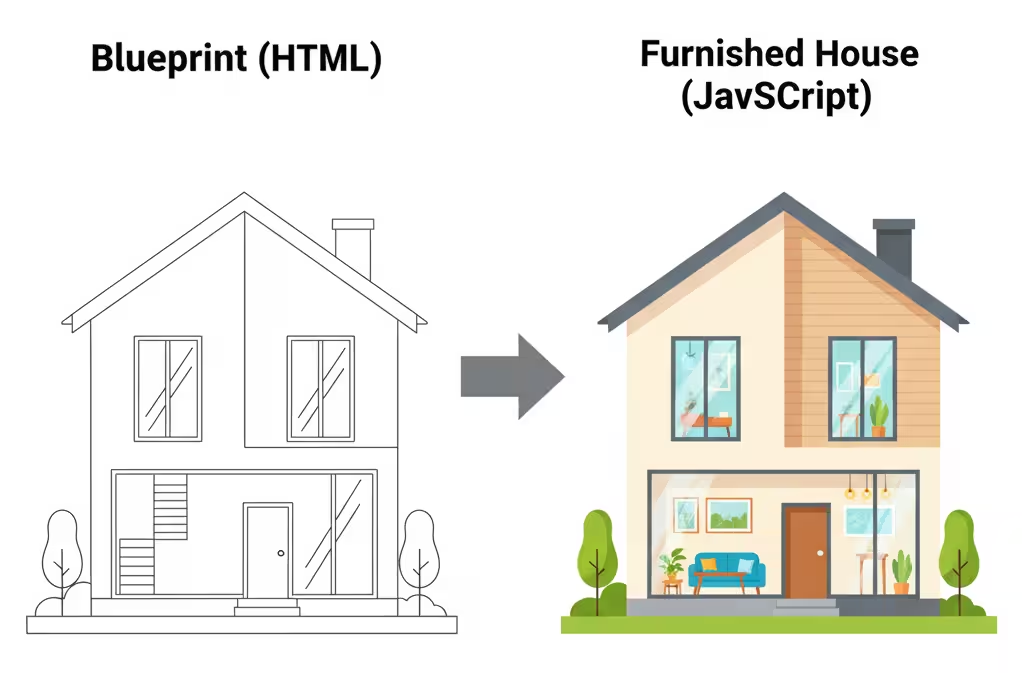
It’s important to know that crawlers don’t see a page the way we do, at least not at first. Initially, a crawler just reads the page’s raw HTML code, which is like reading the script for a play before the actors go on stage. It gets the core text and finds any links right away.
But many modern sites use JavaScript to add interactive elements, load content dynamically, or change the layout. To see this, the crawler has to perform a second, more expensive step called ‘rendering,’ which is like watching the full performance with all the actors and special effects. Because this second step takes more time and resources, any content that relies on JavaScript might get discovered and indexed more slowly than the simple content in your HTML.
The Loop Of Discovery
You might think that once a crawler has visited your site, its job is done, but the reality is that crawling is a continuous loop. The web is always changing, so crawlers have to constantly revisit pages to check for new information, updates, or dead links. But how often does a crawler come back? It all comes down to priority. A popular, important page or a blog that publishes new articles every day will be visited far more often than a ‘Terms and Conditions’ page that hasn’t been touched in a year. The crawler learns how often your content changes and adjusts its visit schedule to be as efficient as possible, always aiming to keep the search index fresh.
How You Control Web Crawlers
Your Website’s “Do Not Enter” Sign: Robots.Txt
The single most powerful tool you have for controlling crawlers is a simple text file called robots.txt. Before a well-behaved crawler (like Googlebot) even begins to scan your website, it first looks for this file at the root address, like yourwebsite.com/robots.txt. This file acts as a set of ground rules. You can use it to tell all crawlers, or even specific ones, that certain pages, files, or entire directories are off-limits. This is incredibly useful for preventing them from trying to index admin pages, internal search results, or other low-value content, which helps guide their attention to the pages that truly matter.
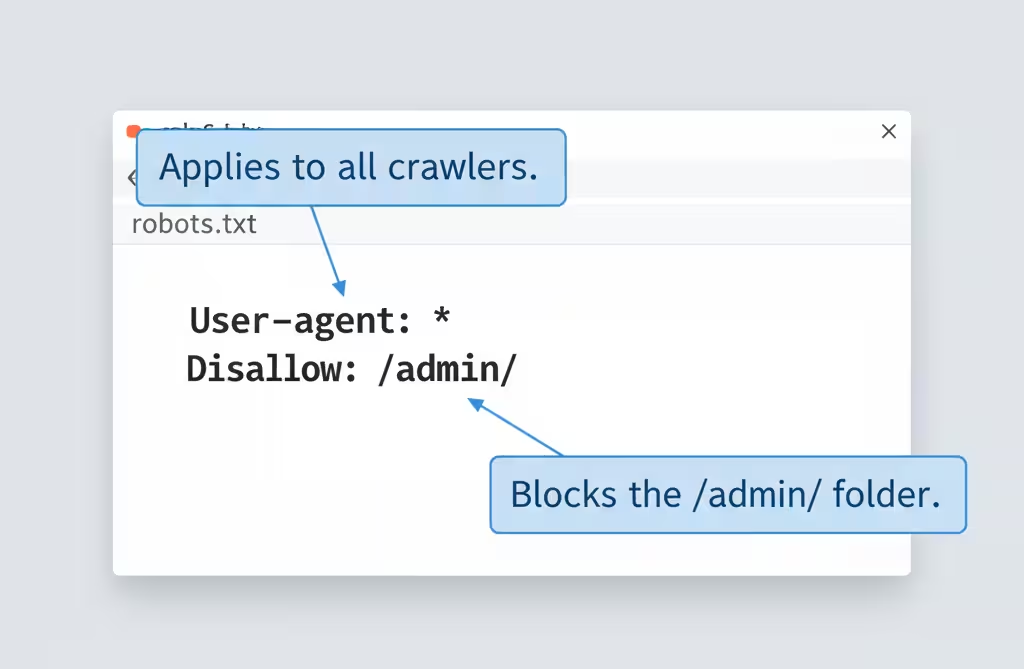
Think of writing robots.txt rules like leaving a set of instructions for different types of visitors.
- To Whom It May Concern (User-agent): First, you state who the instruction is for. Writing
User-agent: *is like saying, ‘This rule applies to everyone.’ If you wroteUser-agent: Googlebot, it would be an instruction only for Google’s crawler. - The ‘Off-Limits’ List (Disallow): Next, you list the areas that are off-limits. Writing Disallow: /private/ is like saying, ‘Do not enter the private folder.’ Each Disallow rule should be on its own line.
- The ‘Exception to the Rule’ (Allow): This is a specific permission. If you wanted to block a whole folder but allow access to one file inside it, you would use Allow.
Page-Specific Instructions: Meta Tags
For page-level instructions, you use a special HTML code called the meta robots tag. Imagine you’re giving a researcher (a crawler) access to your company’s files. You’d use different levels of classification to control what they do with the information.
- A Locked Filing Cabinet (robots.txt): (As discussed in 3.1) This is putting folders in a locked cabinet. The researcher isn’t allowed to see the files inside.
- ‘For Internal Use Only’ Stamp (noindex): You can hand the researcher a document, but stamp it ‘For Internal Use Only.’ They are allowed to read it for context, but they are strictly forbidden from including it in their public report. This is what noindex does for pages you don’t want in search results (e.g., internal search results, admin pages).
- ‘Unverified Sources’ Note (nofollow): You can add a note to the document that says, ‘The sources cited here are not to be trusted or contacted.’ This tells the researcher not to follow those leads or pass authority through those links.
The Preferred Route: Xml Sitemaps
Why would you let a crawler guess which of your pages are the most important? While link-following is a crawler’s main job, an XML Sitemap allows you to guide the process with precision. It’s less of a command and more of a strong, trusted recommendation that search engines use to crawl your site more intelligently. Submitting a sitemap provides several key advantages:
- Ensures Full Discovery: It acts as a safety net, guaranteeing that search engines know about every important page, even if your internal linking isn’t perfect.
- Provides Important Context: You can include extra data in the sitemap, like when a page was last modified, to help crawlers prioritize what to re-crawl after an update.
- Accelerates Indexing: When you publish a new blog post or launch a new section of your site, updating your sitemap is the fastest way to get a crawler’s attention and have your new content indexed.
Your 5-Point Crawler-Friendly Checklist
1. Check Your Site Structure
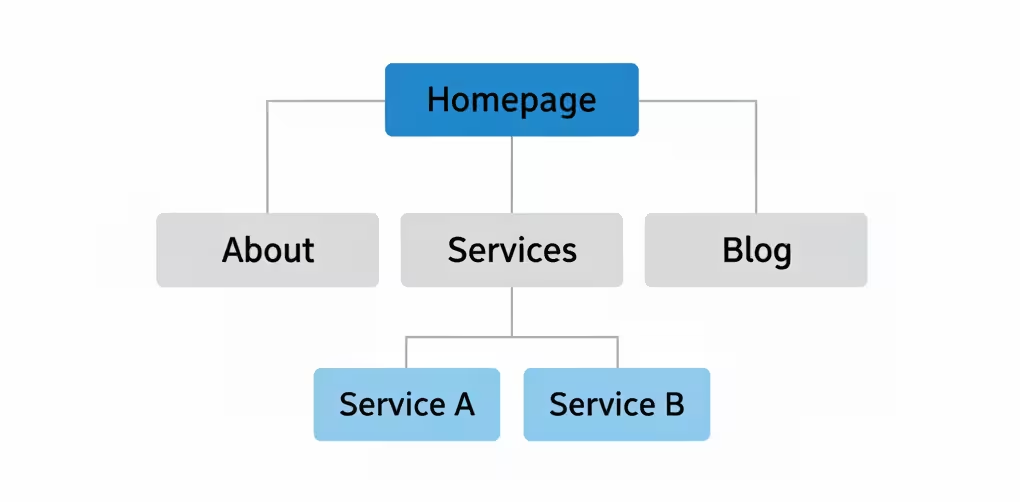
A golden rule of SEO is that if a human user finds your site confusing to navigate, a web crawler will too. Your site’s structure, or ‘information architecture,’ is the foundation of crawlability. A logical structure helps crawlers understand your site’s main themes and how your content is related. Aim for a structure that is:
- Hierarchical: Start with your broad homepage, flow into major categories (e.g., ‘Services,’ ‘Blog’), and then to specific pages or posts.
- Shallow: Ensure your most important content is accessible within 3 clicks from the homepage. Deeply buried pages are crawled less often.
- Logical: Use clear and descriptive URLs (e.g.,
.../services/technical-seoinstead of.../page-id-123) that reinforce the content hierarchy.
2. Strengthen Your Internal Linking
Internal links are the single most powerful way you can signal to crawlers which of your pages are the most important. Every link from one of your pages to another is like a vote of confidence that tells a crawler, ‘This page matters.’ A strong linking strategy ensures that this ‘link authority’ flows throughout your site, helping crawlers understand your content’s structure and importance.
- Use Contextual Links: The best links are placed within the body of your content. Linking the phrase ‘our technical SEO services’ to your service page is far more powerful than a generic ‘click here.’
- Link to Your ‘Pillar’ Content: Identify your most important pages (e.g., your main service pages). Whenever you write a related blog post, make sure you link back to that central ‘pillar’ page.
- Fix Broken Links: A broken internal link is a dead end for a crawler. Regularly use a tool like the Creeper SEO Audit to find and fix any 404 errors or broken links on your site.
3. Boost Your Page Speed
Page speed is more than just keeping users from bouncing; it’s a critical signal for crawl efficiency. Search engines allocate a ‘crawl budget‘—a set amount of time and resources—for visiting your site. A slow website wastes this budget, meaning crawlers may leave before they’ve discovered all your important content. A faster site allows for a more efficient crawl, helping more of your pages get indexed more quickly.
- Measure Your Core Web Vitals: Use Google’s PageSpeed Insights tool to get a baseline score for your site’s speed and user experience on both mobile and desktop.
- Compress Your Images: Large, unoptimized image files are one of the most common causes of slow pages. Use tools to compress them without sacrificing quality.
- Improve Server Response Time: Your web hosting matters. A slow server adds time to every single request a crawler makes. Invest in quality hosting to ensure a snappy response.
- Leverage Caching: Caching stores parts of your site so they don’t have to be loaded from scratch for every visitor (including crawlers), dramatically improving loading times.
4. Clean Up Dead Ends
Think of a crawler as a librarian trying to catalog all the books in your library. An internal link is like a reference in one book that says, ‘For more information, see book XYZ.’ A broken link is when the librarian goes to find book XYZ and discovers its shelf is empty. This ‘404 error‘ is frustrating, breaks the chain of information, and prevents the value of the first book from being properly connected to the second. Regularly cleaning up these dead ends is critical.
- Find Your Broken Links: You don’t need to hunt for these manually. Free tools like Google Search Console will report them to you. A dedicated site audit tool like the Creeper SEO Audit will also provide a comprehensive list of all internal and external broken links.
- Fix Them with 301 Redirects: The best way to fix a broken link is to set up a 301 redirect. This is a permanent ‘change of address’ notice that automatically sends any crawler or user from the old, broken URL to the new, relevant page.
- Make it a Habit: Checking for broken links isn’t a one-time task. Make it a monthly or quarterly part of your website maintenance routine to keep your site healthy and efficient.
5. Use Proper Redirects
Web pages don’t last forever. You might restructure your site, improve your URLs, or consolidate old content. When you do, you can’t just delete the old page and create a new one, as you would lose all the SEO authority that the old page has built up. The correct solution is a 301 redirect. It’s a server-side instruction that tells all browsers and crawlers that a page has permanently moved. This is a critical signal that not only sends the visitor to the right place but also tells search engines to transfer all the rankings and link value from the old URL to the new one.
From Invisible To Indexed
Summary Of Key Lessons
Making your site crawler-friendly is the first and most important step in any successful SEO strategy. Everything we’ve discussed is about removing friction and making the crawler’s job as easy as possible. When you make it easy for search engines to understand your site, you make it easy for them to rank it. The most important lessons to remember are:
- Guide, Don’t Obstruct: Use
robots.txt,noindextags, and XML sitemaps as your toolkit to give crawlers clear instructions. - Think Like a Crawler: Build a logical site structure and a strong internal linking web so there are no dead ends or orphan pages.
- Speed is a Feature: A faster website means a more efficient crawl, which can lead to faster indexing of more of your pages.
- Always Be Maintaining: Regularly check for broken links and ensure redirects are in place to keep your site healthy and authoritative.
Your Next Step
You’ve taken the crucial first step by understanding how crawlers work. Now, let’s turn that knowledge into measurable improvements. Instead of manually checking for broken links or trying to visualize your site structure, you can use a tool that does it for you instantly. The Creeper SEO Audit was built for this exact purpose:
- It automates the checklist: Our crawler checks for all the issues in Chapter 4 and more, from broken links to slow pages.
- It translates complexity into simplicity: We don’t just give you data. We give you a simple, easy-to-understand health score.
- It provides an actionable plan: You’ll get a prioritized list of exactly what to fix and how to fix it, turning your audit into immediate action.
Ready to see your report? Register for free and run your free website audit now.